Python 装饰器
目录
学习目标
- 理解装饰器的概念和工作原理
- 掌握函数装饰器和类装饰器的编写
- 学会使用带参数的装饰器
- 理解多个装饰器的叠加顺序
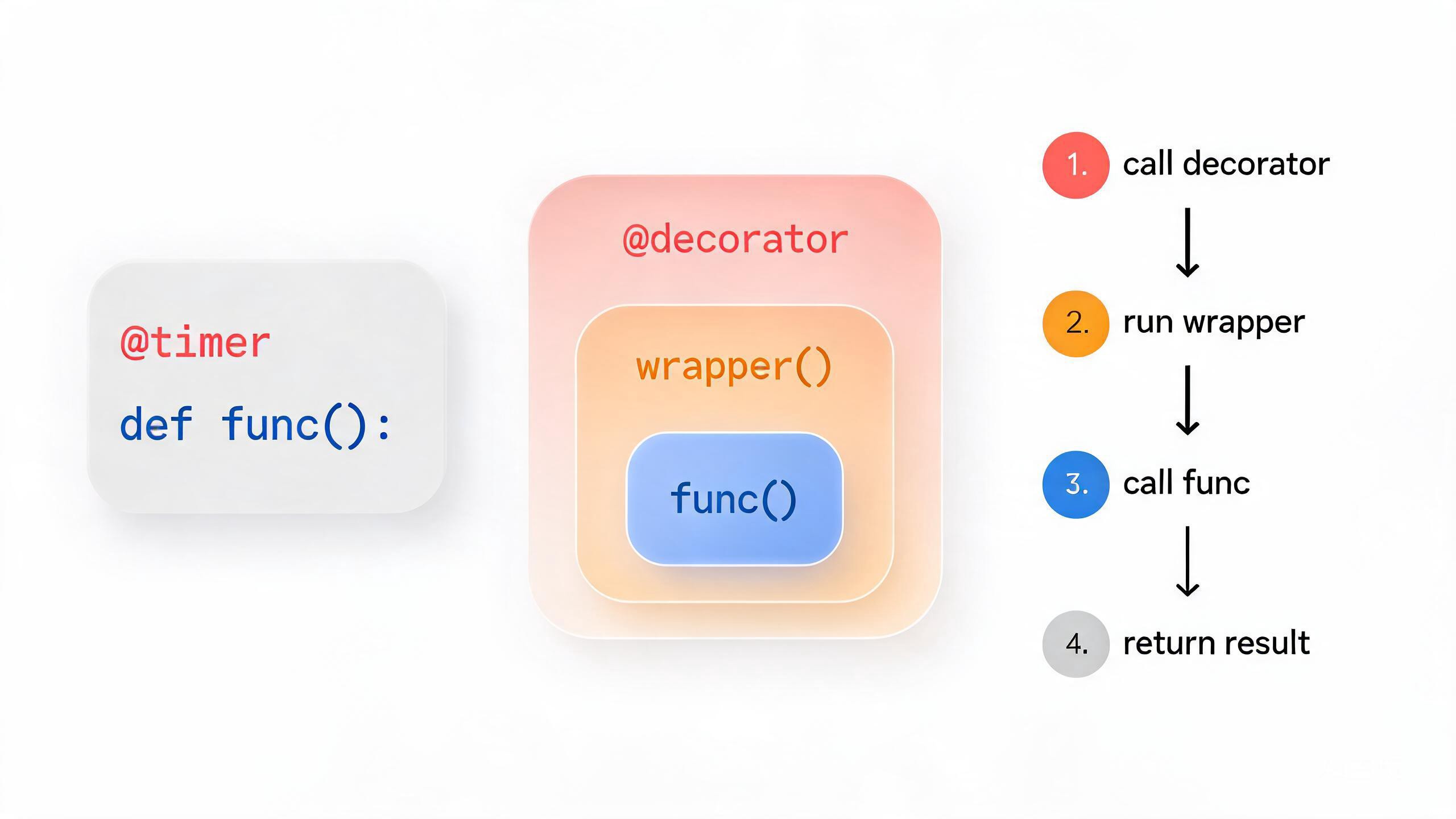
1. 装饰器基础
**装饰器(Decorator)**本质上是一个高阶函数,它接收一个函数作为参数,并返回一个新的函数。
1.1 最简单的装饰器
def my_decorator(func):
    """简单装饰器"""
    def wrapper():
        print("函数执行前")
        func()
        print("函数执行后")
    return wrapper

def say_hello():
    print("你好!")

# 手动装饰
say_hello = my_decorator(say_hello)
say_hello()
输出:
函数执行前
你好!
函数执行后
1.2 使用 @ 语法糖
def my_decorator(func):
    def wrapper():
        print("=" * 20)
        func()
        print("=" * 20)
    return wrapper

@my_decorator  # 等价于 say_hello = my_decorator(say_hello)
def say_hello():
    print("你好!")

say_hello()
输出:
====================
你好!
====================
2. 带参数的被装饰函数
2.1 使用 *args, **kwargs
def log_decorator(func):
    """记录函数调用的装饰器"""
    def wrapper(*args, **kwargs):
        print(f"调用 {func.__name__},参数: {args}, {kwargs}")
        result = func(*args, **kwargs)
        print(f"{func.__name__} 返回: {result}")
        return result
    return wrapper

@log_decorator
def add(a, b):
    return a + b

@log_decorator
def greet(name, greeting="你好"):
    return f"{greeting}, {name}!"

# 测试
add(3, 5)
greet("小明", greeting="早上好")
2.2 保持函数元信息
from functools import wraps

def proper_decorator(func):
    """正确的装饰器写法"""
    @wraps(func)  # 保留原函数的元信息
    def wrapper(*args, **kwargs):
        """包装函数"""
        return func(*args, **kwargs)
    return wrapper

@proper_decorator
def example():
    """示例函数"""
    pass

# 对比有无 @wraps
print(f"函数名: {example.__name__}")      # example(有 @wraps)
print(f"文档: {example.__doc__}")          # 示例函数
3. 带参数的装饰器
3.1 三层嵌套装饰器
def repeat(num):
    """重复执行 num 次的装饰器"""
    def decorator(func):
        @wraps(func)
        def wrapper(*args, **kwargs):
            for i in range(num):
                print(f"第 {i + 1} 次执行:")
                result = func(*args, **kwargs)
            return result
        return wrapper
    return decorator

@repeat(3)
def say_hi():
    print("嗨!")

say_hi()
输出:
第 1 次执行:
嗨!
第 2 次执行:
嗨!
第 3 次执行:
嗨!
3.2 计时装饰器
import time
from functools import wraps

def timer(prefix=""):
    """计时装饰器"""
    def decorator(func):
        @wraps(func)
        def wrapper(*args, **kwargs):
            start = time.time()
            result = func(*args, **kwargs)
            elapsed = time.time() - start
            print(f"{prefix}[{func.__name__}] 耗时: {elapsed:.4f} 秒")
            return result
        return wrapper
    return decorator

@timer("[性能] ")
def slow_function():
    time.sleep(0.1)
    return "完成"

slow_function()
4. 常用装饰器示例
4.1 缓存装饰器
def memoize(func):
    """简单缓存装饰器"""
    cache = {}

    @wraps(func)
    def wrapper(*args):
        if args not in cache:
            cache[args] = func(*args)
            print(f"缓存新结果: {args}")
        else:
            print(f"使用缓存: {args}")
        return cache[args]

    wrapper.cache = cache  # 暴露缓存
    return wrapper

@memoize
def fibonacci(n):
    """斐波那契数列"""
    if n < 2:
        return n
    return fibonacci(n - 1) + fibonacci(n - 2)

print(fibonacci(5))
print(fibonacci(5))  # 使用缓存
print(f"缓存内容: {fibonacci.cache}")
4.2 权限检查装饰器
def require_login(func):
    """要求登录的装饰器"""
    @wraps(func)
    def wrapper(user, *args, **kwargs):
        if not user.get("is_logged_in"):
            return "请先登录"
        return func(user, *args, **kwargs)
    return wrapper

def require_admin(func):
    """要求管理员权限"""
    @wraps(func)
    def wrapper(user, *args, **kwargs):
        if user.get("role") != "admin":
            return "需要管理员权限"
        return func(user, *args, **kwargs)
    return wrapper

# 使用
@require_login
@require_admin
def delete_user(user, user_id):
    return f"已删除用户 {user_id}"

# 测试
admin = {"name": "管理员", "is_logged_in": True, "role": "admin"}
guest = {"name": "访客", "is_logged_in": False}

print(delete_user(admin, 123))
print(delete_user(guest, 123))
4.3 重试装饰器
import time
from functools import wraps

def retry(max_attempts=3, delay=1):
    """失败重试装饰器"""
    def decorator(func):
        @wraps(func)
        def wrapper(*args, **kwargs):
            for attempt in range(1, max_attempts + 1):
                try:
                    return func(*args, **kwargs)
                except Exception as e:
                    print(f"第 {attempt} 次尝试失败: {e}")
                    if attempt == max_attempts:
                        raise
                    time.sleep(delay)
            return None
        return wrapper
    return decorator

attempt_count = 0

@retry(max_attempts=3, delay=0.5)
def unstable_function():
    """不稳定的函数"""
    global attempt_count
    attempt_count += 1
    if attempt_count < 3:
        raise ValueError("模拟错误")
    return "成功!"

print(unstable_function())
5. 类装饰器
5.1 使用函数作为类装饰器
def singleton(cls):
    """单例模式装饰器"""
    instances = {}

    def wrapper(*args, **kwargs):
        if cls not in instances:
            instances[cls] = cls(*args, **kwargs)
        return instances[cls]

    return wrapper

@singleton
class Database:
    def __init__(self):
        print("初始化数据库连接")

    def query(self, sql):
        return f"执行: {sql}"

# 测试
db1 = Database()
db2 = Database()
print(db1 is db2)  # True
5.2 使用类作为装饰器
class CountCalls:
    """统计函数调用次数的类装饰器"""

    def __init__(self, func):
        from functools import update_wrapper
        update_wrapper(self, func)
        self.func = func
        self.count = 0

    def __call__(self, *args, **kwargs):
        self.count += 1
        print(f"{self.func.__name__} 被调用了 {self.count} 次")
        return self.func(*args, **kwargs)

@CountCalls
def process_data():
    print("处理数据...")

process_data()
process_data()
process_data()
6. 多个装饰器的叠加
def decorator_a(func):
    print("装饰器 A 应用")
    def wrapper(*args, **kwargs):
        print("A - 之前")
        result = func(*args, **kwargs)
        print("A - 之后")
        return result
    return wrapper

def decorator_b(func):
    print("装饰器 B 应用")
    def wrapper(*args, **kwargs):
        print("B - 之前")
        result = func(*args, **kwargs)
        print("B - 之后")
        return result
    return wrapper

@decorator_a
@decorator_b
def my_function():
    print("函数执行")

print("\n--- 调用函数 ---")
my_function()
输出:
装饰器 B 应用
装饰器 A 应用

--- 调用函数 ---
A - 之前
B - 之前
函数执行
B - 之后
A - 之后执行顺序:从内到外应用(bottom-up),从外到内执行(top-down)。
7. 实际应用:方法装饰器
class Calculator:
    """计算器类"""

    def __init__(self):
        self.history = []

    def _log_operation(func):
        """记录操作的装饰器"""
        def wrapper(self, *args):
            result = func(self, *args)
            self.history.append(f"{func.__name__}{args} = {result}")
            return result
        return wrapper

    @_log_operation
    def add(self, a, b):
        return a + b

    @_log_operation
    def multiply(self, a, b):
        return a * b

    def get_history(self):
        return self.history

calc = Calculator()
calc.add(2, 3)
calc.multiply(4, 5)
print(calc.get_history())
# ['add(2, 3) = 5', 'multiply(4, 5) = 20']
本节小结
- 装饰器:接收函数作为参数并返回新函数的高阶函数
- @ 语法糖:
@decorator等价于func = decorator(func) - @wraps:使用
functools.wraps保留原函数元信息 - 带参数的装饰器:需要三层嵌套函数
- 类装饰器:通过
__init__和__call__实现 - 多个装饰器:应用顺序从内到外,执行顺序从外到内
练习
- 编写一个装饰器,限制函数的执行时间,超时抛出异常
- 实现一个装饰器,自动将函数的字符串结果转换为大写
- 创建一个类装饰器,为类中的所有方法添加日志功能
- 编写参数化装饰器
@validate_type(int, str),检查参数类型