Python HTTP 协议与 Web 框架
目录
学习目标:理解 HTTP 协议的核心概念,掌握请求/响应模型,了解 Python 主流 Web 框架的设计哲学和基本结构。
1. HTTP 协议基础
1.1 什么是 HTTP
HTTP(HyperText Transfer Protocol,超文本传输协议)是 Web 通信的基础,基于客户端-服务器架构,使用请求-响应模式。
客户端        服务器
  |    请求     |
  | ----------> |
  |            |
  |    响应     |
  | <---------- |
1.2 HTTP 请求结构
GET /api/users?id=1 HTTP/1.1      ← 请求行(方法 + 路径 + 版本)
Host: api.example.com             ← 请求头
Accept: application/json
User-Agent: Python/3.11
Content-Type: application/json    ← 内容类型(POST/PUT 时)
Content-Length: 45                ← 内容长度

{"name":"john","age":30}         ← 请求体(可选)
1.3 HTTP 响应结构
HTTP/1.1 200 OK                   ← 状态行(版本 + 状态码 + 描述)
Content-Type: application/json    ← 响应头
Content-Length: 123
Date: Mon, 01 Jan 2024 00:00:00 GMT
Server: nginx/1.18.0

{"id":1,"name":"john"}           ← 响应体
2. HTTP 方法
| 方法 | 用途 | 幂等性 | 安全性 |
|---|---|---|---|
| GET | 获取资源 | 是 | 是 |
| POST | 创建资源 | 否 | 否 |
| PUT | 更新资源(完整) | 是 | 否 |
| PATCH | 更新资源(部分) | 否 | 否 |
| DELETE | 删除资源 | 是 | 否 |
| HEAD | 获取响应头 | 是 | 是 |
| OPTIONS | 获取支持的方法 | 是 | 是 |
幂等性:多次执行结果相同。安全性:不改变服务器状态。
3. HTTP 状态码
2xx 成功
| 状态码 | 含义 | 使用场景 |
|---|---|---|
| 200 | OK | 请求成功 |
| 201 | Created | 资源创建成功 |
| 204 | No Content | 成功但无返回内容 |
3xx 重定向
| 状态码 | 含义 | 使用场景 |
|---|---|---|
| 301 | Moved Permanently | 永久重定向 |
| 302 | Found | 临时重定向 |
| 304 | Not Modified | 缓存有效,使用缓存 |
4xx 客户端错误
| 状态码 | 含义 | 使用场景 |
|---|---|---|
| 400 | Bad Request | 请求参数错误 |
| 401 | Unauthorized | 未认证 |
| 403 | Forbidden | 无权限 |
| 404 | Not Found | 资源不存在 |
| 422 | Unprocessable Entity | 验证错误 |
5xx 服务器错误
| 状态码 | 含义 | 使用场景 |
|---|---|---|
| 500 | Internal Server Error | 服务器内部错误 |
| 502 | Bad Gateway | 网关错误 |
| 503 | Service Unavailable | 服务不可用 |
4. 使用 Python 发送 HTTP 请求
4.1 urllib 模块(标准库)
from urllib.request import urlopen, Request
from urllib.parse import urlencode
import json

# 简单的 GET 请求
response = urlopen('https://httpbin.org/get')
data = response.read().decode('utf-8')
print(f"状态码: {response.status}")
print(f"响应: {data[:200]}")

# 带 Headers 的请求
req = Request(
    'https://httpbin.org/get',
    headers={'User-Agent': 'Python Tutorial'}
)
response = urlopen(req)
print(f"\n带 Headers 请求状态: {response.status}")

# POST 请求
post_data = urlencode({'name': 'john', 'age': '30'}).encode('utf-8')
req = Request(
    'https://httpbin.org/post',
    data=post_data,
    headers={'Content-Type': 'application/x-www-form-urlencoded'},
    method='POST'
)
response = urlopen(req)
result = json.loads(response.read().decode('utf-8'))
print(f"\nPOST 响应: {result.get('form')}")
4.2 requests 库(第三方)
# 安装: pip install requests
import requests

# GET 请求
response = requests.get('https://httpbin.org/get')
print(f"状态码: {response.status_code}")
print(f"内容类型: {response.headers['content-type']}")
print(f"JSON 数据: {response.json()['url']}")

# 带参数
params = {'page': 1, 'limit': 10}
response = requests.get('https://httpbin.org/get', params=params)
print(f"\nURL: {response.json()['args']}")

# POST JSON
data = {'name': 'john', 'age': 30}
response = requests.post('https://httpbin.org/post', json=data)
print(f"\nPOST JSON: {response.json()['json']}")

# 自定义 Headers
headers = {'Authorization': 'Bearer token123'}
response = requests.get('https://httpbin.org/headers', headers=headers)

# 处理响应
response = requests.get('https://httpbin.org/get')
print(f"\n文本: {response.text[:100]}")
print(f"编码: {response.encoding}")
print(f"原始内容: {response.content[:50]}")
4.3 会话和 Cookie
import requests

# 使用 Session 保持状态
session = requests.Session()

# 设置全局 Headers
session.headers.update({'User-Agent': 'MyApp/1.0'})

# 登录(示例)
# session.post('https://example.com/login', data={'user': 'john', 'pass': '123'})

# 后续请求自动携带 Cookie
# response = session.get('https://example.com/profile')

# Cookie 操作
response = requests.get('https://httpbin.org/cookies/set/name/john')
print(f"Cookie: {response.cookies.get('name')}")

# 发送 Cookie
cookies = {'session': 'abc123'}
response = requests.get('https://httpbin.org/cookies', cookies=cookies)
print(f"发送的 Cookie: {response.json()['cookies']}")
5. Web 框架概述
5.1 什么是 Web 框架
Web 框架是用于简化 Web 应用开发的工具集,通常提供:
- 路由系统:URL 到处理函数的映射
- 请求/响应处理:解析请求、构造响应
- 模板引擎:动态生成 HTML
- 数据库集成:ORM 或数据库连接
- 中间件:请求处理管道
- 安全特性:CSRF 保护、认证等
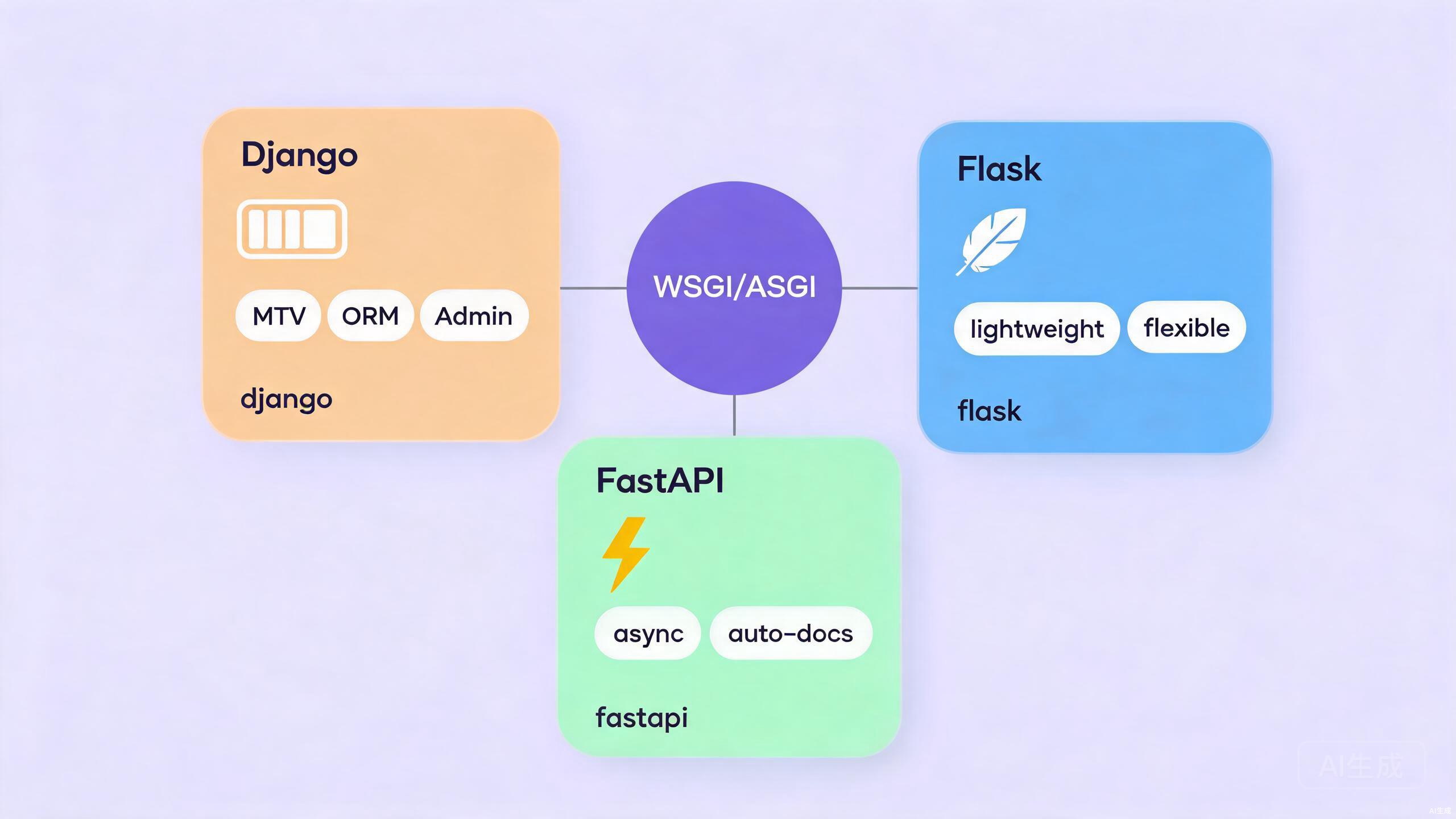
5.2 Python Web 框架分类
Python Web 框架
├── 全栈框架(Full-Stack)
│   ├── Django          ← "自带电池",功能完备
│   └── Pyramid         ← 灵活,可伸缩
├── 微框架(Micro)
│   ├── Flask           ← 轻量,灵活
│   ├── Bottle          ← 单文件,极简
│   └── Falcon          ← 高性能 API
├── 异步框架(Async)
│   ├── FastAPI         ← 现代,自动文档
│   ├── Tornado         ← 长连接,WebSocket
│   └── Sanic           ← 类 Flask 异步
└── 实时框架
    └── Django Channels ← WebSocket 支持
5.3 WSGI 与 ASGI
| 规范 | 全称 | 特点 | 代表框架 |
|---|---|---|---|
| WSGI | Web Server Gateway Interface | 同步,标准成熟 | Flask, Django |
| ASGI | Asynchronous Server Gateway Interface | 异步,支持 WebSocket | FastAPI, Django Channels |
# WSGI 应用基本结构
def wsgi_app(environ, start_response):
    """最简单的 WSGI 应用"""
    status = '200 OK'
    headers = [('Content-Type', 'text/plain')]
    start_response(status, headers)
    return [b'Hello WSGI']

# ASGI 应用基本结构
async def asgi_app(scope, receive, send):
    """最简单的 ASGI 应用"""
    await send({
        'type': 'http.response.start',
        'status': 200,
        'headers': [[b'content-type', b'text/plain']]
    })
    await send({
        'type': 'http.response.body',
        'body': b'Hello ASGI'
    })
6. 简单的 Web 服务器实现
6.1 使用 http.server(标准库)
# 命令行启动静态服务器
# python -m http.server 8000

# 编程方式使用
from http.server import HTTPServer, BaseHTTPRequestHandler
import json

class SimpleHandler(BaseHTTPRequestHandler):
    def do_GET(self):
        """处理 GET 请求"""
        if self.path == '/':
            self.send_response(200)
            self.send_header('Content-Type', 'text/html')
            self.end_headers()
            self.wfile.write(b'<h1>Hello Python Web!</h1>')

        elif self.path == '/api/data':
            self.send_response(200)
            self.send_header('Content-Type', 'application/json')
            self.end_headers()
            data = {'message': 'Hello API', 'status': 'ok'}
            self.wfile.write(json.dumps(data).encode())

        else:
            self.send_response(404)
            self.end_headers()
            self.wfile.write(b'Not Found')

    def do_POST(self):
        """处理 POST 请求"""
        content_length = int(self.headers['Content-Length'])
        body = self.rfile.read(content_length)

        self.send_response(201)
        self.send_header('Content-Type', 'application/json')
        self.end_headers()

        response = {
            'received': body.decode('utf-8'),
            'path': self.path
        }
        self.wfile.write(json.dumps(response).encode())

    def log_message(self, format, *args):
        """自定义日志"""
        print(f"[{self.date_time_string()}] {args[0]}")

# 启动服务器
# server = HTTPServer(('localhost', 8000), SimpleHandler)
# print("服务器启动: http://localhost:8000")
# server.serve_forever()
6.2 路由系统原理
class SimpleRouter:
    """简单路由系统"""

    def __init__(self):
        self.routes = {}

    def route(self, path, methods=None):
        """路由装饰器"""
        methods = methods or ['GET']

        def decorator(func):
            self.routes[(path, tuple(methods))] = func
            return func
        return decorator

    def handle(self, path, method='GET'):
        """处理请求"""
        for (route_path, methods), handler in self.routes.items():
            if route_path == path and method in methods:
                return handler()
        return "404 Not Found"

# 使用
router = SimpleRouter()

@router.route('/', ['GET'])
def home():
    return "首页"

@router.route('/api/users', ['GET'])
def get_users():
    return "用户列表"

@router.route('/api/users', ['POST'])
def create_user():
    return "创建用户"

# 测试
print(router.handle('/'))
print(router.handle('/api/users', 'GET'))
print(router.handle('/api/users', 'POST'))
7. RESTful API 设计
7.1 REST 原则
"""
RESTful API 设计规范

资源: /users          ← 用户集合
      /users/123      ← 单个用户

HTTP 方法映射 CRUD:
POST   /users         → 创建用户 (Create)
GET    /users         → 获取用户列表 (Read)
GET    /users/123     → 获取单个用户 (Read)
PUT    /users/123     → 更新用户 (Update)
PATCH  /users/123     → 部分更新 (Update)
DELETE /users/123     → 删除用户 (Delete)
"""

# 示例 API 响应格式
user_api_response = {
    "id": 123,
    "name": "张三",
    "email": "zhangsan@example.com",
    "created_at": "2024-01-15T08:30:00Z",
    "links": {
        "self": "/api/users/123",
        "orders": "/api/users/123/orders"
    }
}

# 集合响应格式
users_api_response = {
    "data": [
        {"id": 1, "name": "用户1"},
        {"id": 2, "name": "用户2"}
    ],
    "pagination": {
        "page": 1,
        "per_page": 10,
        "total": 100,
        "total_pages": 10
    },
    "links": {
        "first": "/api/users?page=1",
        "next": "/api/users?page=2",
        "last": "/api/users?page=10"
    }
}
8. 小结
| 概念 | 要点 |
|---|---|
| HTTP | 请求-响应协议,无状态 |
| 方法 | GET/POST/PUT/DELETE 对应 CRUD |
| 状态码 | 2xx 成功,4xx 客户端错误,5xx 服务器错误 |
| WSGI/ASGI | Python Web 应用与服务器接口规范 |
| Web 框架 | Django(全栈)、Flask(微框架)、FastAPI(异步) |
9. 练习题
- 使用
requests获取 GitHub API 的公开仓库信息,解析 JSON 响应。 - 实现一个简单的 RESTful API 路由系统,支持 GET/POST/PUT/DELETE。
- 对比
urllib和requests的代码量差异,理解抽象的价值。 - 查看你常用网站的 HTTP 响应头,分析使用了哪些技术和策略。
下节预告:我们将进入 Django 框架,学习这个 Python 最流行的全栈 Web 框架的核心概念和基本用法。